What it is
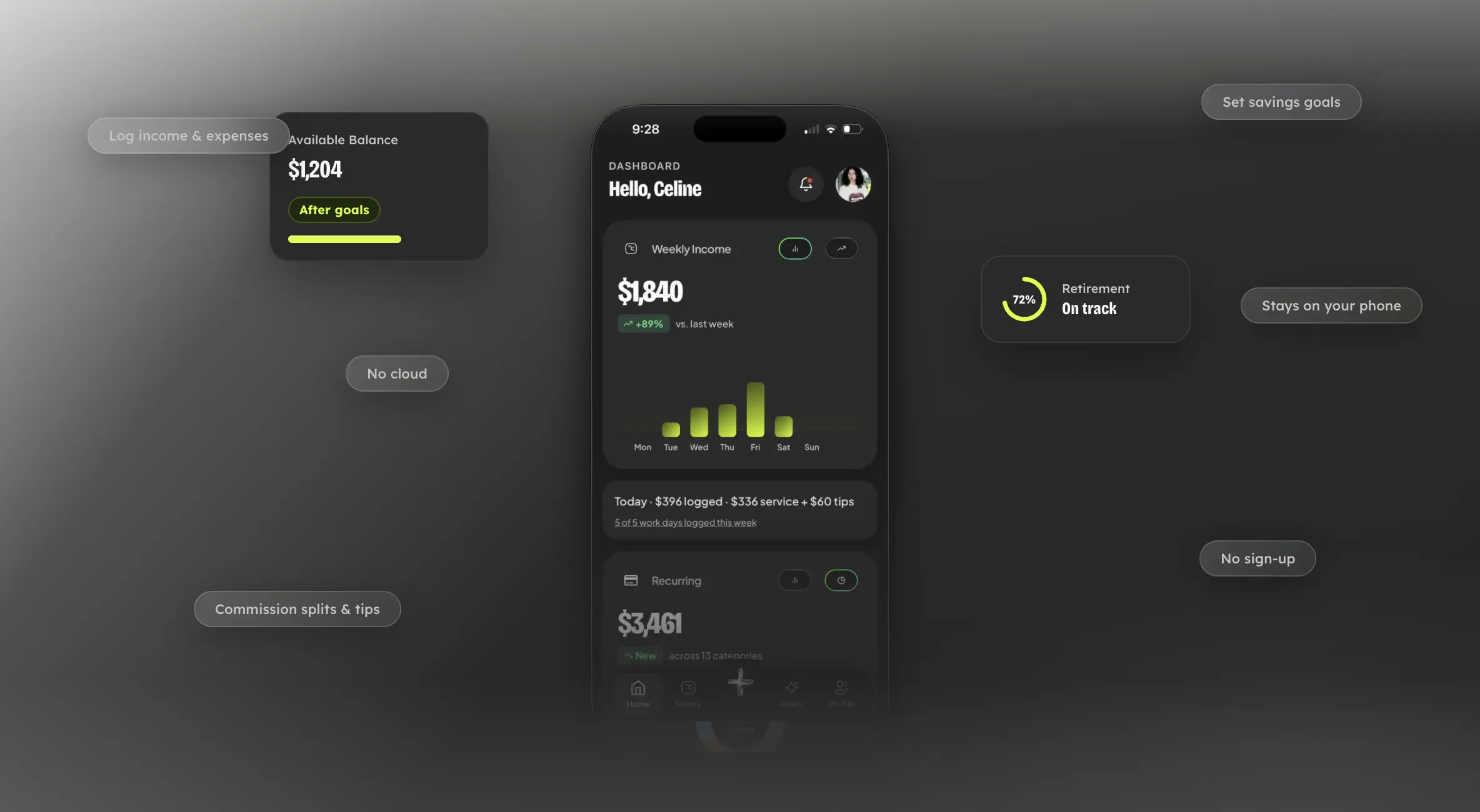
Stellar is a local income/expense tracker with an AI retirement assistant feature.
This project is very meaningful and personal to me. Being in the industry for a while, I saw a problem I really wanted to solve by digitizing it.
Why beauty pros
This has been my career for over 7 years. Observing how my colleagues thinking about their future like retirement, urge me to help them solve this problem.
Retirement is important, no one wants to work until the day the die. The problem is, most beauty industry jobs ( nails, hair, makeup,...) are considered freelance ( either 1099 ) or don't benefit from employer's retirement plan.
Also, retirement planning is not easy, most people have to learn about what personal accounts are suitable for them, especially with their fluctuating income.
What it does
3 core features that Stellar offers:
- Track income and expenses. Log what you earned and what you spent. The app does the math on what you actually keep.
- Set goals. Save for something specific. The app tells you how much to set aside and what you have left to spend.
- Polaris. A built-in retirement assistant that reads your numbers and gives monthly investment recommendations.
Local data, no account
When in researching phase ( pre-build ) , I've found out from asking around about what my colleagues and my customers that from other area of the industry. Most of them are not really using any income/expense tracker, simply because they don't feel comfortable sharing their financial datas.
So , Stellar is built on top of the privacy first principle, and I quite like that and got many positive feedbacks from it.
And of course, there will be trade-offs:
- No sync across devices.
- No automatic cloud backup.
Polaris
As the name of the AI, you can expect the meaning is "the North Star" of the whole app. This is the feature that I put alot of efforts in to design and build. Let's ask this question from first principle:
Wouldn't it be nice to have an assistant to look at your **NET BALANCE** at the end of the month and give you some recommendations on your retirement savings?
Different with other tax type , freelance workers have to find their own retirement fund, especially with their paychecks varies monthly, it became a bottle-neck and most would get lazy and give up before the compountding happens.
There are a few gaps we could close:
**1**. Most people in this cohort would Google or ChatGPT to get a rough estimate of the monthly contribution.
**2**. This leads to re-enter financial datas into these engines on every request.
**3**. The reponse will be vague because they don't really understand the full context of how much this person has earned/spent and the pattern of their income
So, Polaris tries to solve this, by reading selected datas from user's database and give them a more personalized recommendation.
A quick note : Polaris has been constrained to only recommend RETIREMENT ACCOUNTS only, no stock picks or trading advice.
→ How I Added AI to a Finance App With No BackendHow Polaris calls the LLM
Money data stays on the phone, but Polaris still needs an LLM. API keys cannot live in the app binary.
A Cloudflare Worker sits in the middle: the app sends minimized aggregates, the worker holds keys, enforces the paywall, and returns structured JSON.
I wrote a detailed overview with the link below, please check it out if you're interested.:
→ How I Added AI to a Finance App With No BackendSQLite on device
All money data lives in a local SQLite database through expo-sqlite. No account, no cloud ledger.
Only the repository layer talks to the database. Boot runs integrity checks and WAL mode; totals come from SQL aggregates, not JavaScript .reduce().
→ How I Added AI to a Finance App With No BackendHow the app stays in sync
40+ screens and 280+ components all need the same ledger totals. Prop drilling refresh callbacks does not scale.
The stack is layered: UI → hooks → repositories → SQLite. Zustand holds form drafts and modal state only. After every write, a small pub/sub bus tells subscribed screens to reload.
→ Front End ArchitectureIncome math for commission workers
This is the part generic apps miss. Each income row stores two numbers: amount (what the client paid or what you typed) and yourShare (what actually counts toward your balance).
For commission workers on a detail entry: your share = (service amount × commission %) + tips.
For quick entry, commission and tips can save as separate rows. Same math, just split.
Tips, salary, and bonus rows are always 100% your share. Solo workers keep 100% on everything.
One source of truth for the whole app: net balance = total income (SUM of yourShare) minus total expenses.
→ How I Added AI to a Finance App With No BackendNotifications
No cloud cron, no push server. The phone is the scheduler: a daily check reads SQLite and registers local alarms through expo-notifications.
Income nudges, bill reminders, missing-entry alerts, and backup prompts all respect a quiet window and show up in an in-app bell feed.
Please check this article out if you're interested in how to build notifications without a backend:
→ Notifications Without a BackendGoals and recurring bills
Goals: set a target. The app calculates how much to allocate and how much you have left to spend. Two ways to fund a goal: split from income when you log it, or move existing balance into a goal from the goal detail screen.
Recurring bills: define a bill and how often it repeats. Stellar reminds you when it is due. It does not deduct from your balance until you tap mark paid. You stay in control.
→ Front End ArchitectureClosing
Stellar is built like a journal that can do math. Log your real numbers. The app tells you what to set aside, especially for retirement.
I made a lot of trade-offs on purpose. No cloud sync. No automatic backup. Data minimization instead of full anonymity for Polaris. The product matches the philosophy I started with: your money stays yours, on your phone, with tools that actually fit how beauty pros work.
There is still room to improve. But the core is solid and honest about what it is.
IOS for v1