What it is
Aesthetikk is a photo editor that runs entirely in the browser. Like Lightroom or VSCO, but you dont have to install it.
Instagram filters on gear 💉 💦, 900+ color presets and other tools that make your photos look cinematic.
Why I built it
Its kind of genetic why I love photography, since my dad and his dad were photographers. Had my first DSLR at 11 and started to taking mad photos and editing mad shits on Lightroom, Instagram or VSCO( you know the cheesy filters + effects ).
After gaining forbidden knowledge from my 1st app, I found the LUTs and see how scattered it is to have to buy these LUTs on Etsy or whever , and have to download Lightroom to use these, becaue it's 3D textures, so kind of a pain in the ass. Then I just had an urge to build some thing like Lightroom or VSCO but with all the presets I collected.
I would name it just Aesthetic but the domain Aesthetic.com is not available so, Aesthetikk it is 🤵🏻♂️.
How it works
The flow is simple, I would assume you have used any photo app before, even your Instagram:
- Drop or upload your image.
- Browse preset categories and tap a filter.
- Adjust brightness, contrast, grain, bloom, tone curves, and more.
- Export it infinitely.
Tech stack
I picked a stack that let me focus on the hard parts (GPU rendering, caching, memory) without rebuilding auth and file storage from zero.
- Next.js for the frontend and SSR, middleware for auth logics, API routes.
- Supabase for main auth ( Oauth) and LUTs metadata.
- Cloudflare R2 for LUT file storage, served through CDN.
- Zustand for state management across the editor.
LUT library
LUTs are just fancy word for colors ( color science ) that you would see on almost every images online.
It simply emulates the colors of the professional camera , and mostly no one ever uploads a photo without a LUT applied.
Over the years, I found myself buying and collecting both free and paid LUTs, at the end of the day, LUTs is a base color and you still have to work your way to adjust other stuffs.
So, 970 LUTs was offered in Aesthetikk to give you a headstart and you can always adjust the other stuffs later.
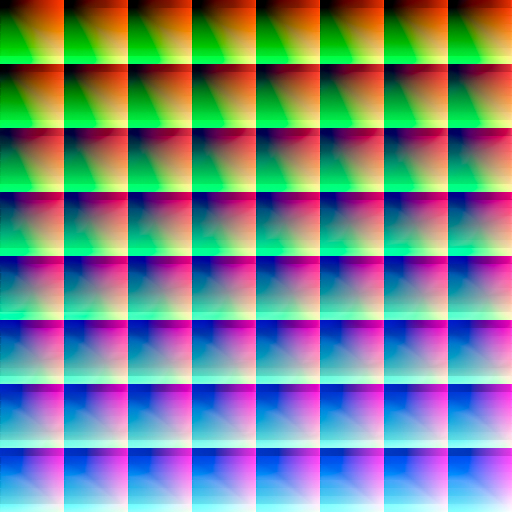
This is a sample LUT texture that has been converted from 3D to 2D
The color engine
So how does a LUT actually change your photo? Through a custom WebGL2 color engine on the GPU.
Each LUT preset is a 64³ color cube stored as a 512×512 PNG. On top of that, there are 11 effect stages: basic adjustments (brightness, contrast, saturation), plus advanced ones like film grain, bloom, tone curves, clarity, and more. All written in GLSL shaders, registered and compiled at runtime.
The high-level flow:
- UI sliders and filter picks call hooks like useWebGLCanvas and useColorEngine to load the image and init the engine.
- ColorEngine (the facade) runs initialize(), applyEffects(), and renderTexturesToCanvas().
- The 11 pipelines are registered in pipeline-config.ts and run in order every frame.
- Each stage checks isEnabled(). If the slider is at zero, that stage is skipped. No wasted GPU work.
LUT caching
970 LUTs is an inventory problem on the server. In the browser, it is a working-set problem. Users never get the full catalog at once.
Three tiers keep memory under control:
- Tier 0: Cloudflare R2 holds the PNG files. Signed URLs with a 15-minute TTL.
- Tier 1: IndexedDB on disk. Users download a whole category in one batch API call. Cached locally with a 500MB cap and LRU eviction.
- Tier 2: GPU VRAM through LutCacheBridge. Hot LUTs stay as WebGL textures (cap: 10 textures or 50MB). Oldest gets evicted when full.
Memory management
Photo editors create a crazy amount of temp memory. Without active cleanup, the tab slows down, crashes, or gets killed. Especially on mobile Safari.
Dual resolution was the first fix. When you upload a photo, the display version is capped at 2048px max. That is what the GPU edits in real time. The original full-resolution file is stored quietly and only used at export.
Every createObjectURL needs a matching revokeObjectURL. Every preview frame creates a texture, runs the pipeline, then deletes it. Full engine teardown on unmount. GPU caches clear when the WebGL context is lost. Undo/redo history is capped at 30 steps.
On export, we use 0.92 JPEG quality. Some browsers (Safari, Chrome on mobile) can still hit out-of-memory on very large exports. That is a known trade-off for client-side processing.
→ Caching & Memory ManagementSlider performance
The sidetab sliders do not talk to the GPU directly. They just write numbers to Zustand. One hook (useColorEngine) watches those values and repaints the canvas.
The key trick is requestAnimationFrame throttling. When you drag a slider, the engine repaints at most once per screen frame (~60fps). Not on every single value change.
Debounce was too slow. It waits until you stop dragging, so the preview lags behind your finger. useEffect on every slider was worse. Each value change triggers a re-render and a full GPU pass. With 11 effects, that adds up fast.
Sidetab components are the remote control. RAF is the speed limit on how often the canvas refreshes.
→ Smooth Sliders: RAF Throttling in ReactText behind image
Text-behind is the effect where words sit behind a person or object but in front of the background. You need to know where the subject is, then composite the layers correctly.
Aesthetikk runs background removal on device using WASM/ONNX through @imgly/background-removal. No server API for ML. The foreground mask gets saved as a blob URL in Zustand.
At preview: WebGL canvas for the graded background, HTML text overlay, and an image mask for the foreground subject. At export: full-resolution ColorEngine pass, then Canvas 2D for text placement, then the foreground mask on top.
Closing
This was a very fun experience , I learned alot about some technical aspects of my favorite photo editors.
Aesthetikk was really meant to combined all of the fav features of those photo editors into one app, and close the bridge of photography lover have to buy LUTs and subscribe to another app to use it.
There's many more room to improve, but so far the foundation is very solid and I'm proud of it, on to the next journey, we get to Stellar.
PWA · WebGL